Interactive Showcase
1. 업데이트 확인 기능(72시간 주기)
1. AcroForm 폼 편집 개선(자동계산_스크립트 인식) 2. 포스터(분할) 인쇄 기능 3. 기타 버그 개선
1. AcroForm 폼 인식(개선) 2. 포커스 없이 휠/줌(편의) 3. 주석이 크롬/엣지 인쇄에서 사라지는 문제(버그) 4. 글자단위 속성 편집(개선) 5. 페이지 자르기+영역지우기 되돌리기 지원(편의)
macOS 정식 출시 (Intel 네이티브 · Apple Silicon 은 Rosetta)
설치 후 우측 상단의 언어 버튼(A文)으로 즉시 전환할 수 있습니다. 처음 실행 시 시스템 언어가 자동 적용됩니다. Switch instantly with the language button (A文) at the top-right after installation. The system language is applied automatically on first launch.
SGPDF라는 이름으로도 불리는 SG PDF Pro는 별도 라이선스 등록 없이 사용할 수 있는 무료 PDF 편집 프로그램입니다. 여러 PDF와 이미지를 하나의 PDF로 합치고, 페이지 순서 변경·삭제·회전·자르기, 텍스트와 주석 편집을 지원합니다. 문서를 외부 서버에 업로드하지 않는 오프라인 PDF 도구라 중요한 파일도 PC 안에서 처리할 수 있습니다. SG PDF Pro, also known as SGPDF, is a free PDF editor with no license activation. Merge PDFs and images, reorder, delete, rotate and crop pages, and edit text or annotations. Files stay on your PC and are processed locally without cloud uploads.
수백 페이지의 설계 도면과 데이터시트도 끊김 없이 부드럽게 열립니다. 자체 개발한 내부 링크 이동 엔진으로 완벽한 호환성을 자랑합니다. Smoothly open hundreds of pages of blueprints and datasheets. Proudly features perfect compatibility with our custom-developed rendering engine.
드래그 앤 드롭만으로 여러 개의 PDF를 하나로 결합하고, 이미지 파일을 PDF로 즉시 변환하는 강력한 파이프라인을 제공합니다. Merge multiple PDFs with a simple drag & drop, and instantly convert image files into PDFs with a powerful pipeline.
클라우드 업로드 없이 100% PC 내부에서 동작하여 중요한 문서의 외부 유출 위험을 줄입니다. 모든 기능은 별도 인증 없이 제공됩니다. Operates 100% locally on your PC without cloud uploads, reducing the risk of sensitive document exposure. Every feature is available without activation.
글로벌 표준 PDF 규격을 준수하며, 직관적인 페이지 자르기(Crop) 및 지정 영역 지우기(Whiteout) 기능을 제공합니다. in compliance with global standard PDF specifications. Offers intuitive page cropping and specific area whiteout features.
텍스트 입력, 도형 및 선 그리기, 구름 마크(Revision Cloud) 등 도면 및 문서 검토에 필수적인 전문 주석 도구를 지원합니다. Supports professional annotation tools essential for document review, including text input, shapes, lines, and revision clouds.
드래그 앤 드롭으로 즉각적인 페이지 순서 변경이 가능하며, 불필요한 페이지 삭제, 방향 회전까지 문서를 원하는 방식으로 재구성할 수 있습니다. Instantly reorder pages via drag & drop. Delete unnecessary pages or rotate directions to reconstruct your documents perfectly.
 1
2
3
4
1
2
3
4
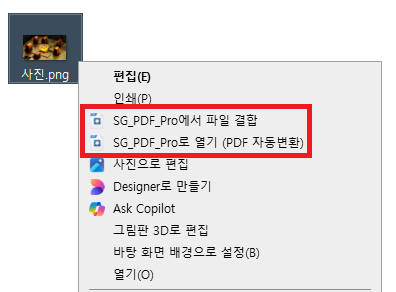
프로그램을 켤 필요 없이 Windows 탐색기(변환·결합)와 macOS Finder(우클릭 병합)에서 마우스 우클릭만으로 즉시 PDF 작업이 가능합니다. Work with PDFs straight from Windows Explorer (convert & merge) or the macOS Finder (right-click merge) — no need to open the app.
이미지, 도면 등 다양한 포맷의 파일들을 전용 결합 창에 드래그 앤 드롭하여 클릭 한 번으로 묶어냅니다. Drag and drop various file formats into the dedicated merge window to combine them into a single PDF with one click.

문서에 추가된 모든 주석 및 텍스트 객체들은 Adobe Acrobat과 부분적으로 호환되어 다른 기기에서도 깨짐 없이 표현됩니다. All added annotations and texts objects are partially compatible with Adobe Acrobat and are displayed correctly on other devices without distortion.
실무 효율을 높여주는 강력한 고급 편집 기능을 모두 사용할 수 있습니다. Use all advanced editing features designed to improve workflow efficiency.
원본 속성 유지Keeps original attributes
Adobe 호환Adobe Compatible
Adobe 호환Adobe Compatible
Adobe 호환Adobe Compatible